Two minutes to set up. Done for the term.
Coursemap does not replace Canvas. It reads it, adds what your syllabi know, and turns the mess into one plan.
Paste a Canvas token
Made from your own Canvas settings page under Approved Integrations. No school approval, no IT ticket. Coursemap encrypts it and uses it only to read your courses and assignments.
Sync your courses
Every active course and every assignment with a due date lands on the board in seconds, each one linked back to the real Canvas page. Sync again any time and nothing you checked off is lost.
Upload each syllabus
We read the PDF and pull out exam dates, grade weights, office hours, the late policy, and the rules that get people dropped. Anything Canvas does not know goes on the class page.
Get a plan for the term
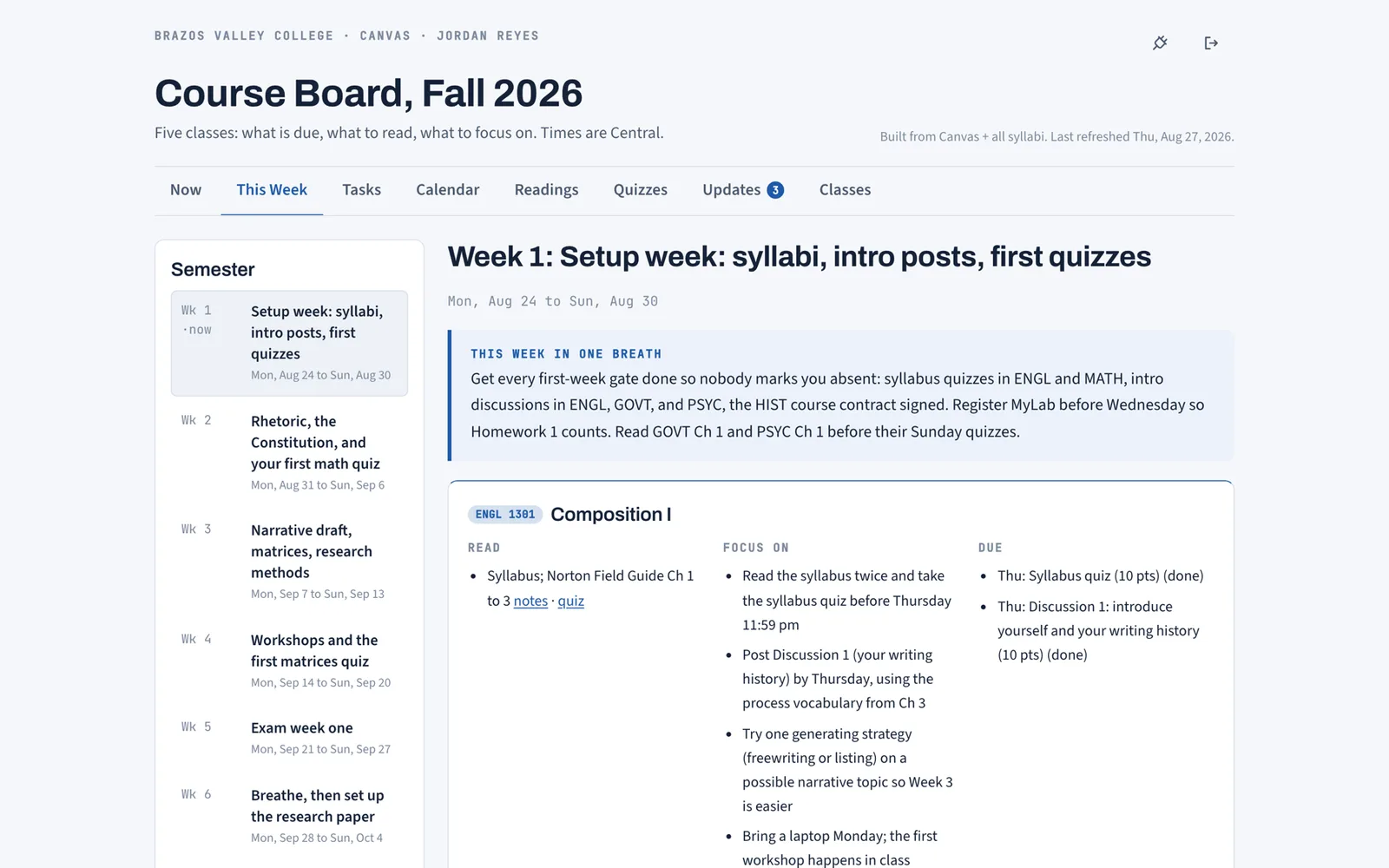
The syllabi and the assignment list become sixteen weeks. Each week has a title, a one-breath focus, and per course: what to read, what to concentrate on, what is due.
Read, quiz, check off
Every assigned chapter gets study notes, terms to define, and an 8 question self-check with explanations. Best scores save to your account. Checkboxes sync across devices.
Not sure about the token step? The FAQ covers where the token comes from and what it can see. If you want to see what a finished plan looks like before you paste anything, the features page shows every board view.
What syncs from Canvas
- Courses, codes, and instructors
- Assignments, quizzes, and discussions with due dates and points
- Links to the exact Canvas page for each item
- Announcements, on every sync
What comes from the syllabus
- Exam dates that never made it into Canvas
- Grade weights and the drop policy
- Attendance rules, late policy, materials to bring
- Office hours and how to reach the instructor
Step four, on screen
The This Week tab after setup: the semester down the left, one week in the middle with a one-breath focus, then a card per course with Read, Focus on, and Due. The syllabus to calendar guide walks through how those weeks get built.
Free while we are in early access. Works with any school on Canvas.
Get started