Syllabus to Calendar: One Semester Plan From Every PDF
How to get every exam, reading, and rule out of your syllabus PDFs onto one semester calendar: by hand in about an hour, or automatically.
By Hunter Forbes
Getting a syllabus into a calendar means three passes over the PDF: one for dated items (exams, papers, the final), one for the weekly reading list, and one for the rules that can cost you the course (attendance limit, late policy, drop date). Do those three passes for every course, put the results on one sixteen-week grid, and you have a semester plan. By hand it is about an hour for a five-course load. From the PDF, with extraction, it is a few minutes.
This guide shows both, and the reason the syllabus, not Canvas, has to be the starting point.
Why the syllabus and not Canvas
Canvas (or eCampus, or Blackboard) holds the assignments the instructor collects online. It rarely holds the exams that happen in a room, the final exam that is on the university schedule, or the reading assigned per week. Those are in the syllabus, and only the syllabus. If you build a calendar from Canvas and never open the PDF, the biggest items of the term are missing from it.
So: syllabus first, then Canvas for the homework.
Pass 1: dated items
Open the PDF. Look for the course schedule table (most syllabi have one, often near the end) and the assessment section. Write down, with a date:
- Every exam, test, midterm, and in-class quiz.
- The final exam date and time. If the syllabus says "see university final exam schedule," look it up now, not in December.
- Papers, projects, presentations, lab practicals, with their due dates.
- Any date that changes the grade: the last day to drop, the last day to withdraw with a W.
If the syllabus gives weeks instead of dates ("Exam 1, week 5"), convert to a real date using the semester start date, which is usually on the first page.
Pass 2: the reading list
Same schedule table. For each week, write the chapters or pages assigned. This is the pass students skip because readings do not feel like deadlines. They are the deadlines: the reading quiz on Thursday is on this week's chapter, and the exam is on the last six weeks of chapters. A reading list on the calendar is the difference between studying and cramming.
If the syllabus lists readings by topic without pages ("Week 4: the Constitution"), note the topic; you can add page numbers from the textbook table of contents later.
Pass 3: the rules
This pass is not calendar items, but it belongs with them because it decides how you treat the calendar. Find and write down:
- Attendance: how many absences before you are dropped or lose points. Some courses drop after three.
- Late policy: percent per day, or no late work at all.
- Grade weights: exams 60 percent, homework 15 percent, and so on. This tells you where hours should go.
- Exam day rules: what to bring, what is banned, whether a makeup exists.
- Office hours and contact: where and when, and whether email or the platform inbox is preferred.
Put these on a one-page card per course. On Coursemap this is the Classes tab.
Build the grid
One row per week, one column per course. Fill in the dated items from pass 1 and the readings from pass 2. Now look at it. You will see the two-exam weeks, the quiet middle, and the three-week pileup at the end. That view is the entire reason to do this in week one instead of week eight.
If you keep a calendar app, add every dated item from pass 1 as an event now, with the course code in the title. Add the Canvas or eCampus feed on top for the online homework (the Canvas calendar guide covers subscribing). Readings go in as all-day items at the start of their week, or into a weekly plan if you keep one; the study schedule guide takes it from there.
Doing it from the PDF instead
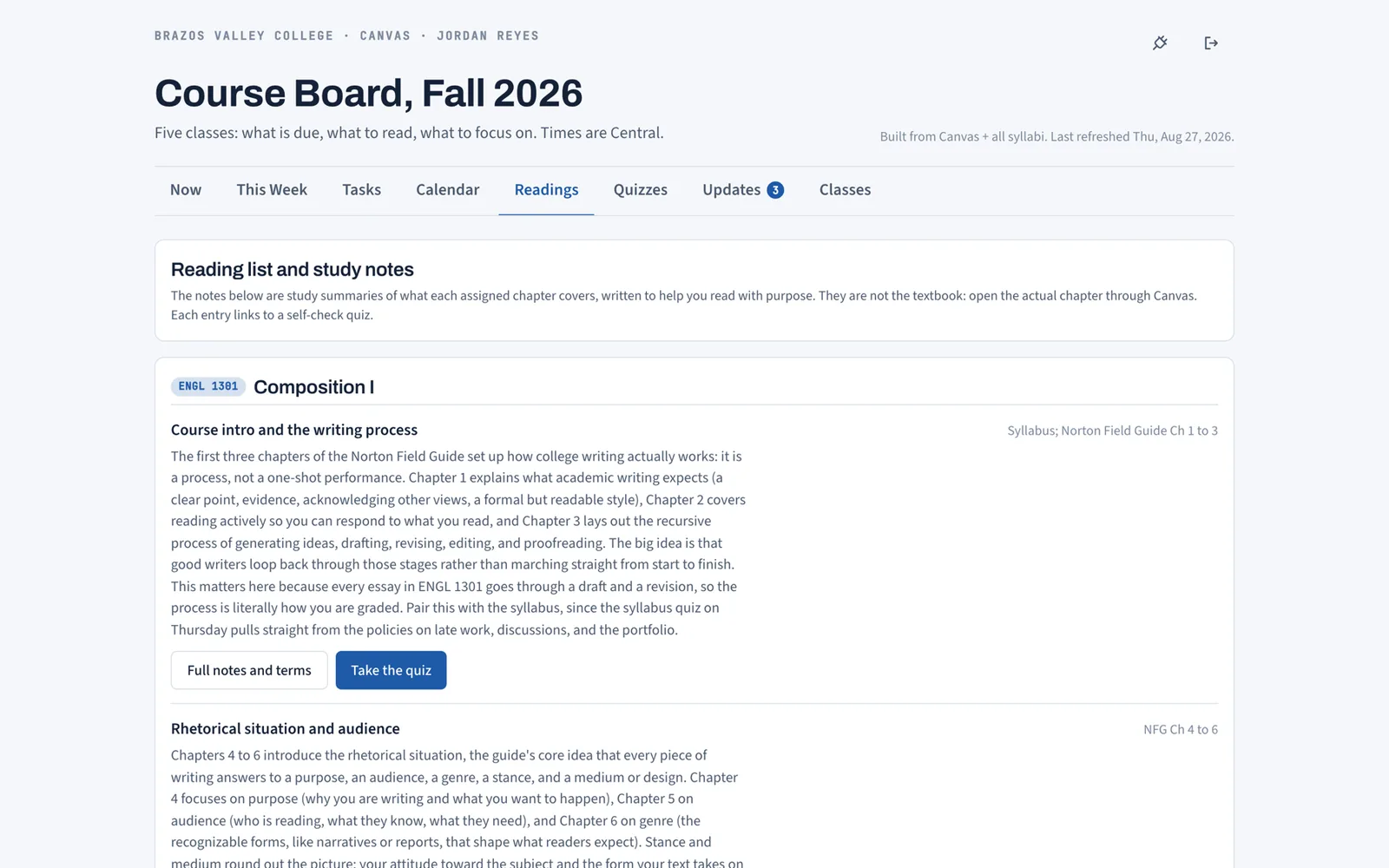
Coursemap does the three passes for you. Upload a syllabus PDF and it extracts the exam dates, the reading list, the grade weights, the late policy, attendance rules, materials to bring, and office hours. Exams and papers become dated tasks on the board; readings become entries on the Readings tab, in chapter order, each with study notes, terms to define, and an 8 question self-check; the rules go on that course's card in Classes.
Do it for every course and the board builds the grid as a sixteen-week plan: each week gets a title and a one-breath focus, and per course a Read, Focus on, and Due list. If your school is on Canvas, a personal access token adds the online assignments to the same board, each linked to its Canvas page. If it is not, the syllabus half still works exactly the same.
A dated item the extraction gets wrong, or a date the instructor moves later, is a one-click edit on the board, and edits are kept on every later sync. The extraction reads what the PDF says; you still read the PDF once, because you are the one who has to know the rules.
A checklist for the first day of class
- Download every syllabus PDF the day it is posted. Some instructors revise them; keep the newest.
- Run the three passes, or upload each one.
- Put every exam and the final on the calendar you actually look at.
- Read the attendance and late policies out loud once. They are the two rules that end semesters.
- Look at the full grid and find the worst week now, while there is time to move things.
What Coursemap does and does not do here
It extracts from any syllabus PDF, for any school. It syncs assignments only from Canvas, because Canvas is the platform that lets students create their own access token; D2L, Blackboard, and Moodle do not. It never writes to your school's platform and never reads or stores grades. It is free while in early access. The features page shows the eight views the plan feeds, and how it works shows the setup in order.
Reading a syllabus schedule table without missing things
Syllabus schedule tables are inconsistent. Some list dates, some list week numbers, some list class meeting numbers ("Class 14"). Some put readings in a column, some in the row above the class they are due for, some in a separate list at the end. A few things that catch people:
- "Week of" dates. A row labeled "Week of Sept 14" with "Exam 1" in it usually means the exam is on one of that week's class days, not Monday. Check the class meeting pattern (MWF or TR) and ask if it is not obvious.
- Readings listed after the class. Some tables list what was covered, not what to read beforehand. If the row for Sept 14 says "Ch 4," check whether the instructor expects it read before Sept 14 or covered on Sept 14. When in doubt, read it before.
- Tentative schedules. Many syllabi say the schedule is subject to change. It will. The calendar is still worth building, and the Sunday check is what keeps it true.
- The final. Often absent from the table because it is on a separate university schedule. Look it up on the first day and write it down.
- Two documents. Some instructors post a syllabus and a separate course calendar. Use both; the calendar usually wins on dates and the syllabus wins on rules.
Extraction handles most of these patterns, but a syllabus that is a scanned image or a table pasted as a picture may extract partially; the board shows what it found and anything missing is a one-line manual task. The Readings tab is where the reading list lands once it is in, and it is the quickest place to spot a chapter the extraction skipped.