Your whole semester on one board.
Connect Canvas, drop in your syllabi, and every deadline lands here with a link to the real assignment. Then read, quiz, and plan the week from the same place.
- QuizCh 3 cell structure quiz10 ptsBIOL 1406 9:00 AM
- HWHomework 2.4 quadratic functions10 ptsMATH 1314 11:59 PM
- ReadChapter 4: The ColoniesHIST 1301 before class
- PostDiscussion 2: memory and learning20 ptsPSYC 2301 11:59 PM
Two minutes to set up
Paste a Canvas token, upload your syllabi, and the whole term is on the board.
Eight views of one semester
Now, This Week, Tasks, Calendar, Readings, Quizzes, Updates, Classes.
Notes and quizzes per chapter
Every assigned reading gets plain-language notes, terms to define, and an 8 question self-check.
Free in early access
No card, no school approval. Works with any college on Canvas.
What Canvas shows you, plus everything it does not.
Canvas lists assignments one course at a time and knows nothing about your syllabus. Coursemap is the one place to see every Canvas assignment, plus the exam dates and rules that only the PDF knows.
One board, every course
Assignments, quizzes, exams, and readings from all your classes, grouped by day. Check them off here, open them in Canvas with one click.
The syllabus, remembered
Late policy, attendance limits, what to bring to the exam. Right on the class page, pulled from the PDF.
A plan for every week
Sixteen weeks, each with a one-breath focus and, per course, what to read, what to concentrate on, and what is due.
Private by default
Your token is encrypted and only your account can read your data. We never touch grades.
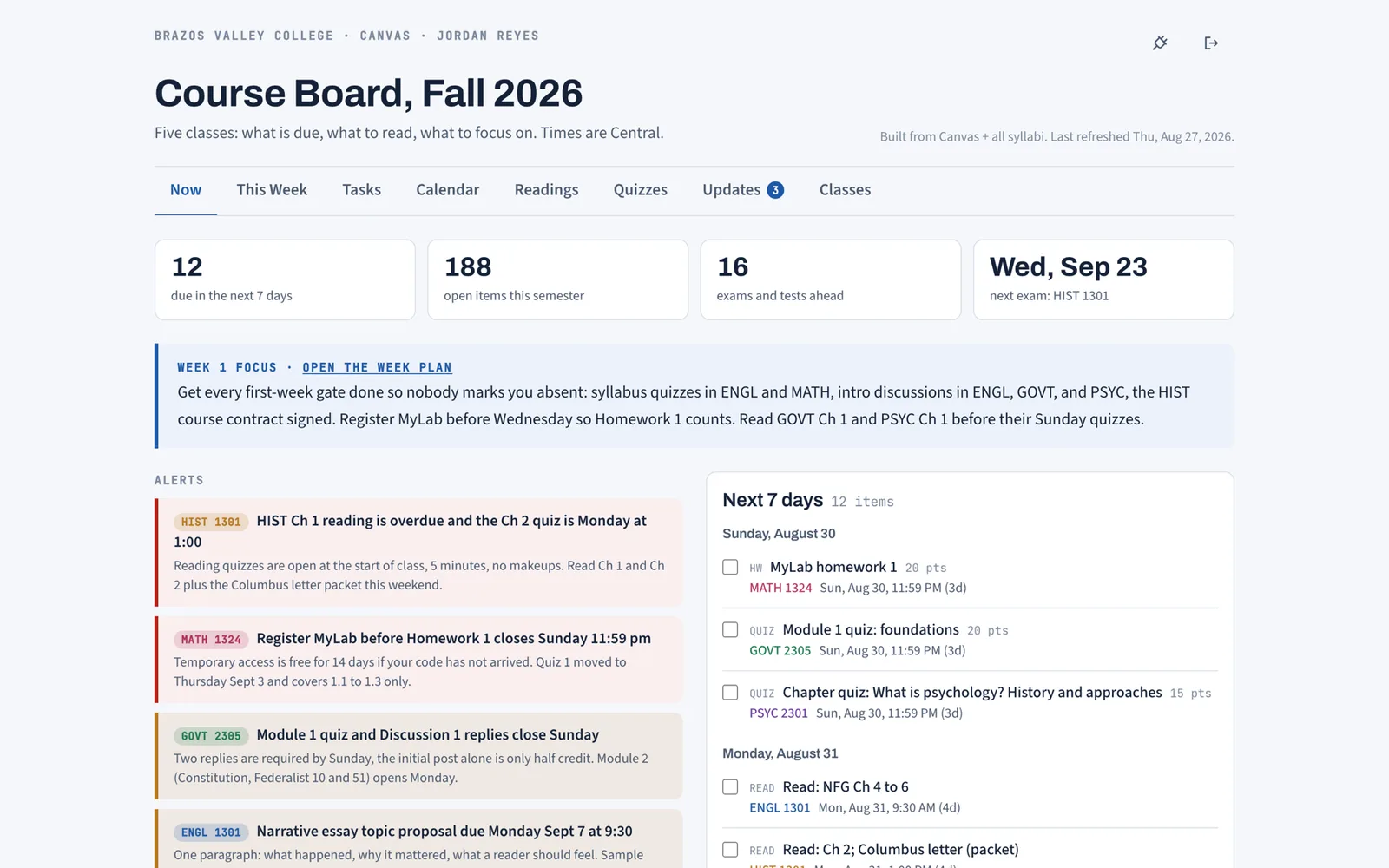
This is the real board.
The Now tab from the demo semester: what is due in seven days, open items, exams ahead, the week's focus, and alerts sorted by how much they can hurt you. Every view is described on the features page, and every reading on it has notes and a practice quiz.
Guides for planning a semester on Canvas
Assignment Tracker for College: Sheets, Notion, or Synced
What a college assignment tracker must do, why Sheets and Notion templates fall behind by week four, and how a Canvas-synced tracker stays current.
How to Make a Study Schedule From Your Syllabus
A study schedule that lasts past week two starts from the syllabus, not a blank calendar. How to build one for a full course load, week by week.
How to See All Your Canvas Assignments in One Place
Four ways to see every Canvas assignment on one screen: the built-in list and calendar, the calendar feed, and a synced board that adds the syllabus.
All guides are on the Coursemap blog.
Free while we are in early access. Works with any school on Canvas.
Get started